In development
Game I/O++
Low-cost USB and Bluetooth game controllers on your Apple II, as Apple joysticks or Sirius Joyport sticks, up to four at once.
In development. Join the newsletter to hear when preorders open.
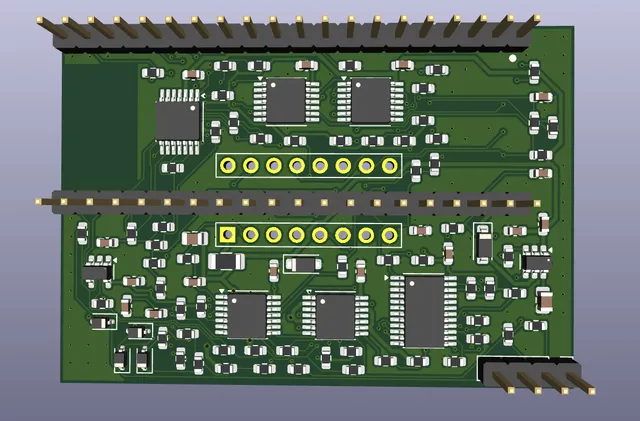
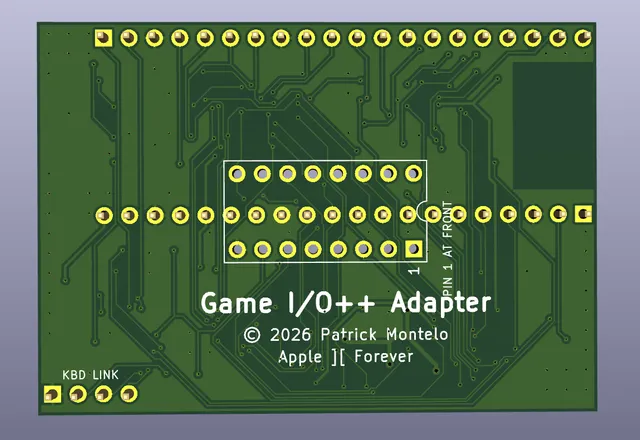
The Game I/O++ plugs into the game I/O socket and lets you play with the controllers you already have. Pair Bluetooth gamepads such as Xbox and PlayStation controllers, or plug in USB ones. The Apple sees ordinary Apple II joysticks, paddles and buttons, so existing games just work.
It also emulates the Sirius Joyport, the adapter for Atari-style joysticks. Connect up to four controllers, mice included, and four-player games like Computer Foosball are back on the table.
- Apple II joystick and paddle emulation, with all four paddles and push buttons
- Sirius Joyport emulation for Atari-style joystick games
- Up to four controllers at once, including mice, which can act as a joystick or as paddles
- Bluetooth and USB controllers, including Xbox and PlayStation pads
- One board size that fits the game socket of the ][, ][ plus, //e and IIgs, with cables out the back
- Firmware updates from your computer, no programmer needed
- Link header for the Keyboard ][++
The 3D views show the board planned for production, which may still change.
Specifications
| Works with | Apple ][, Apple ][ plus, Apple //e, Apple IIgs |
|---|---|
| Installs in | The 16-pin game I/O socket on the motherboard |
| Emulates | Four paddles (two joysticks) and push buttons PB0-PB3; Sirius Joyport for Atari-style joysticks |
| Bluetooth controllers | Xbox Wireless, PlayStation DualShock 4 and clones, generic game pads, mice; up to two at once |
| USB controllers | Xbox One / Series, Xbox 360 wired, Xbox 360 wireless receiver, generic game pads, mice (with an OTG adapter and powered hub) |
| Controllers at once | Up to 4 |
| Mice | Act as a joystick (default) or as paddles, for four-player paddle games |
| Setup and updates | Console and firmware updates over USB or Bluetooth from Windows or macOS |
| Expansion | Keyboard link for the Keyboard ][++ (Open Apple, Closed Apple and the shift-key mod on a ][ or ][ plus) |
| Status | Prototypes working; production board shown, subject to change |
Downloads and documentation
- Game I/O++ Adapter user manual v0.9.3For firmware 0.9.3: installing, controllers, Apple and Atari modes, Bluetooth pairing, the Console program and firmware updates (PDF).
- Game I/O++ Console for Windows v1.20Windows 10 or 11, 64-bit
- Game I/O++ Console for Mac (Apple silicon) v1.20Macs with an M1 or later chip, macOS 11 Big Sur or later
- Game I/O++ Console for Mac (Intel) v1.20Macs with an Intel processor, macOS 11 Big Sur or later
- Third-party software noticesLicences of the open-source software in the firmware and the Console programs.
Ships worldwide. See shipping rates and times.