In development
Keyboard //e++
Use modern USB and Bluetooth keyboards on an Apple //e, and paste text into it straight from your computer.
In development. Join the newsletter to hear when preorders open.
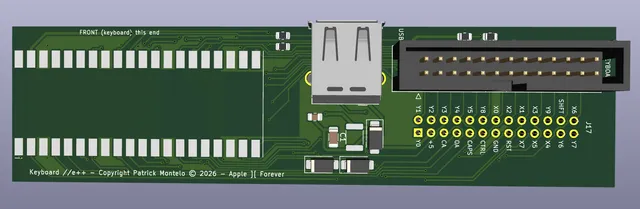
The Keyboard //e++ brings the features of the Keyboard ][++ to the Apple //e. It plugs onto the //e’s keyboard connector, and the //e’s own keyboard plugs into the board, so it keeps working exactly as before. It works on every //e: unenhanced, enhanced and Platinum.
Plug a USB keyboard into the board, pair Bluetooth keyboards, or use them together. Pair it with your Mac or PC over Bluetooth to copy text there and paste it into the //e.
- USB and Bluetooth keyboards at the same time, plus the //e keyboard
- Bluetooth pairing with a modern computer for copy and paste
- Macros: a whole string of keys typed with one key press
- Firmware updates from your computer, no programmer needed
Sample macros
A macro types a whole string of keys with one key press. Put them on the function keys, Home, End and the other keys the Apple has no use for, or on Command plus a letter or number. Macros are saved to and loaded from a plain text file, one per line, so it’s easy to keep a set for DOS 3.3 and another for ProDOS. Here is a set for everyday disk commands:
F1 = CATALOG{Return}
F2 = CAT{Return}
Home = HOME{Return}
Command+A = APPEND{x20}
Command+B = BLOAD{x20}
Command+C = CATALOG{x20}
Command+D = DELETE{x20}
Command+I = INIT{x20}
Command+L = LOAD{x20}
Command+M = MAXFILES{x20}
Command+P = PREFIX{x20}
Command+R = RENAME{x20}
Command+S = SAVE{x20}
Command+U = UNLOCK{x20}
Command+V = VERIFY{x20}
{Return} presses Return, so F1 lists the disk straight away. {x20} is a space: Command+L types LOAD and waits for you to type the file name.
The 3D view is the board planned for production, which may still change.
Specifications
| Works with | Apple //e (unenhanced, enhanced and Platinum) |
|---|---|
| Installs in | The //e's 26-pin keyboard connector (J17), with a pass-through connector so the //e's own keyboard keeps working |
| Keyboards | USB keyboard plus Bluetooth keyboards, alongside the //e keyboard |
| Computer pairing | Bluetooth or USB cable, for copy and paste to the Apple |
| Copy and paste | Paste text or type whole files from your computer onto the //e, paced so nothing is dropped |
| Macros | Strings of keys on Command, function and other spare keys |
| Ports | USB-A for a wired keyboard or wireless dongle |
| Setup and updates | Console app for Windows and macOS; firmware updates over USB or Bluetooth |
| Status | Production board shown, subject to change |
Downloads and documentation
- Keyboard //e++ Adapter user manual v0.9.8For firmware 0.9.8: installing, keyboards, Bluetooth pairing, the Console program, macros and firmware updates (PDF).
- Keyboard //e++ sample macrosDOS 3.3 and ProDOS commands on the function keys and Command+letter. Load them with F7 in Keyboard //e++ Console (text file).
- Keyboard //e++ Console for Windows v1.20Windows 10 or 11, 64-bit
- Keyboard //e++ Console for Mac (Apple silicon) v1.20Macs with an M1 or later chip, macOS 11 Big Sur or later
- Keyboard //e++ Console for Mac (Intel) v1.20Macs with an Intel processor, macOS 11 Big Sur or later
- Third-party software noticesLicences of the open-source software in the firmware and the Console programs.
Ships worldwide. See shipping rates and times.